In today’s fast-paced business environment, email remains the backbone of communication. Microsoft Exchange powers this infrastructure for millions of organizations—but when it comes to backup, conversion, or legacy data extraction, things can get complicated fast. Enter Stellar Converter for EDB, a purpose-built solution that doesn’t just convert EDB files—it helps optimize business operations, data archiving, and support smarter IT management.
This review explains how Stellar Converter for EDB can directly benefit your business—from operational continuity to long-term compliance and cost-efficiency.
Table of Contents
What Is Stellar Converter for EDB?
Stellar Converter for EDB is a professional-grade utility that extracts mailbox data from Microsoft Exchange Server database (EDB) files and exports it to usable formats like PST, Office 365, or a live Exchange environment.
Supports:
- Offline and online EDB files
- All mailbox types (user, archive, shared, public folders)
- Exchange versions 5.5 to 2019
- Export to PST, EML, PDF, RTF, HTML, MSG
Business Benefits at a Glance
| Feature | Business Benefit |
| Fast & Reliable Export | Ensures smooth mailbox extraction and conversion |
| Compliance-Ready Archiving | Export data for audits or legal use |
| Non-Disruptive Workflow | Admins can run exports while users stay connected with Exchange server |
| Cost Optimization | Avoids Exchange downtime, prevents data loss can export data from Live Exchange to PST |
| Forensic & Legal Readiness | Access historical data from old servers or backups |
Installation and User Interface
Installation:
Installing Stellar Converter for EDB is quick and seamless. The installer is compact, and the setup process is guided by a wizard, which completes within minutes on a standard Windows system.
User Interface:
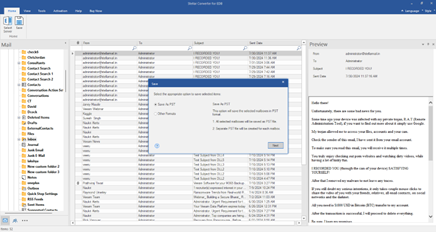
The interface is clean and thoughtfully organized. It resembles Microsoft Outlook in its layout, which helps users feel comfortable navigating through the mailbox structure. The tree-view pane on the left allows easy browsing of all EDB file components, while the right pane displays email contents. Toolbars and actions are clearly labeled, making the conversion process highly intuitive even for first-time users.
Steps to Convert EDB to PST with Stellar Converter for EDB
1. Launch the software and select the offline EDB file you wish to convert.
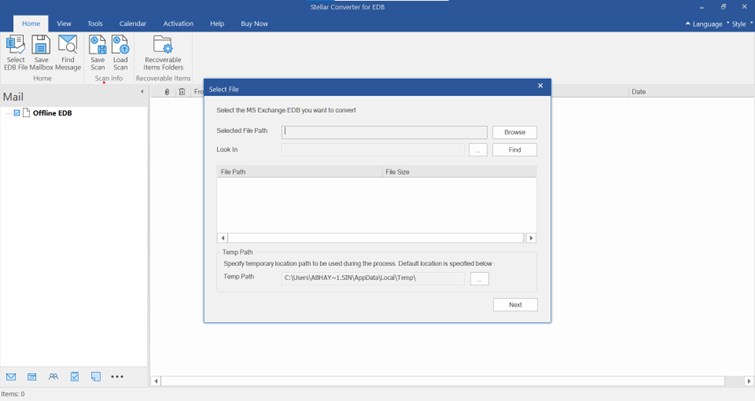
2. Browse or Find Offline EDB File
3. Preview mailbox contents, including emails, attachments, and other folders.
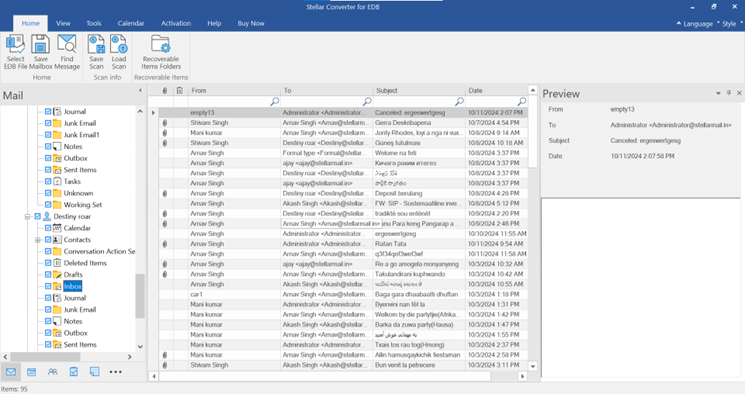
4. Select the required mailboxes or folders you wish to export.
5. Choose ‘Save as PST’ and specify a destination folder.
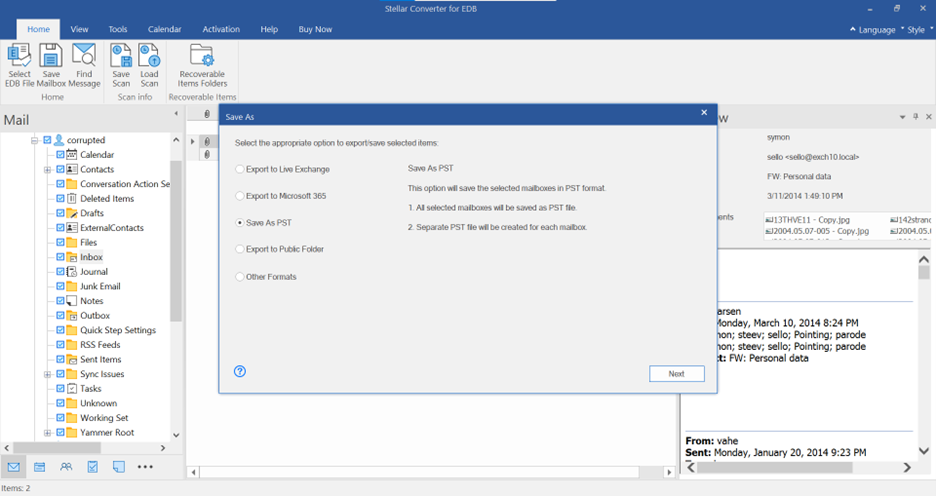
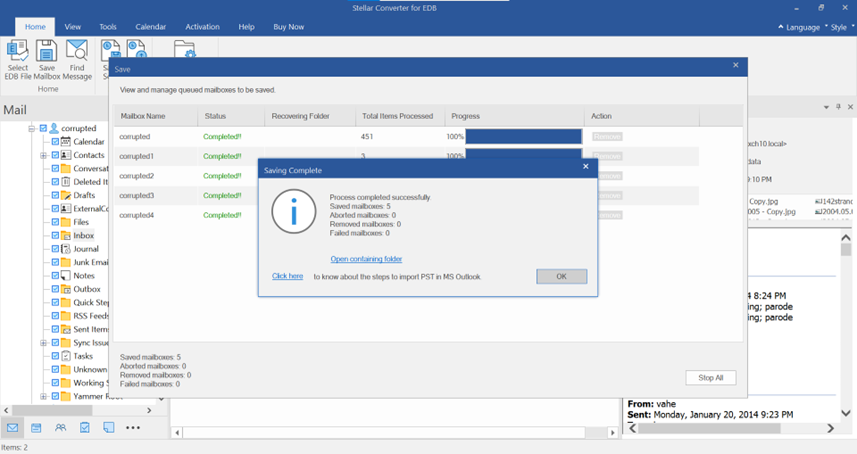
6. Complete the conversion, and your mailbox data will be available as a PST file ready for Outlook.
Hosted Exchange EDB to PST
1. Select Connect to Single Mailbox or Connect to Single Mailbox from Connection Options.
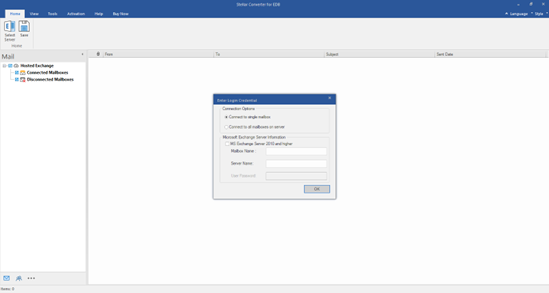
2. Enter Admin Email and Server Name
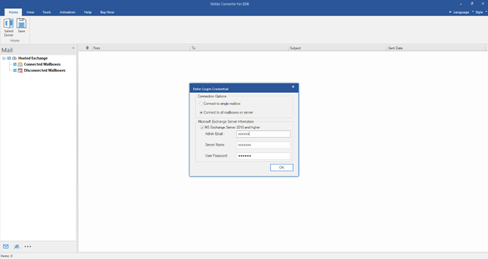
3. Check Connected/Disconnected Mailbox Status
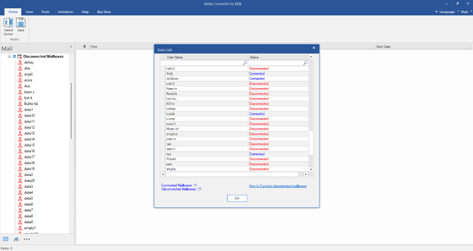
4. Check the preview of all mailbox items
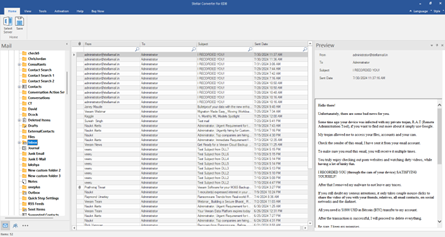
5. Save as PST
Benefits
1. Streamline Complex Exchange Mailbox Extraction and Conversion
When exporting large database to PSTs, mailbox extraction and data transfer can become time-consuming and technically challenging. The software also exports offline EDB to Live Exchange or Office 365. Stellar Converter for EDB simplifies this process, enabling smooth, secure, and efficient transitions:
- Live EDB to PST: Perform mailbox extraction without dismounting the database—keeping services online and users unaffected.
- Auto Mailbox Mapping: Automatically aligns source mailboxes with their corresponding targets in Exchange or Office 365, reducing manual effort and configuration errors.
- Parallel Processing: Converts and exports multiple mailboxes simultaneously, dramatically accelerating project timelines.
2. Extract data from decommissioned Exchange Servers
Stellar Converter allows you to extract data from decommissioned Exchange servers when you have access only to offline or legacy EDB (Exchange Database) files.
3. Meet Compliance, Legal, and Audit Requirements
Stellar Converter for EDB lets businesses:
- Export legacy data from old EDBs for audit trails or compliance reviews.
- Convert to PDF or HTML for readable, court-admissible formats.
- Create structured, exportable data archives.
4. Cut Costs and Boost IT Efficiency
- Avoids the need for full Exchange data export just to access a mailbox.
- Saves time for IT teams—no scripting or PowerShell mastery required.
- Eliminates risk of user downtime with live exports and background operations.
5. Empower IT Teams With Smarter Tools
Stellar Converter for EDB offers an intuitive, Outlook-style UI, meaning:
- No steep learning curve
- In-app previews before exporting
- Drag-and-drop mailbox selection
Final Verdict: Is Stellar Converter for EDB Worth It for Your Business?
Absolutely—especially if you’re managing Exchange data in any capacity. Whether it’s for compliance, migration, mailbox extraction or cost control, Stellar Converter for EDB delivers business-ready results with minimal risk.
Ideal For:
- Enterprises handling legacy data
- IT consultants managing multiple clients
- Regulated industries needing export controls
Pro Tip: Maximize Business Value
Before running your export:
- Clean up mailboxes (archive emails)
- Run a backup and export to PST
- Prioritize VIP or high-volume mailboxes
Schedule export off-hours to avoid performance dips