Quick answer: A VPN (Virtual Private Network) encrypts your internet traffic and routes it through a remote server before it reaches its destination, which hides your real IP address and location from websites, and hides your browsing activity from your internet provider or anyone else on your local network. It doesn’t make you anonymous online, and it doesn’t protect you from malware, phishing, or a website that already knows who you are once you log in.
Table of Contents
How a VPN Actually Works
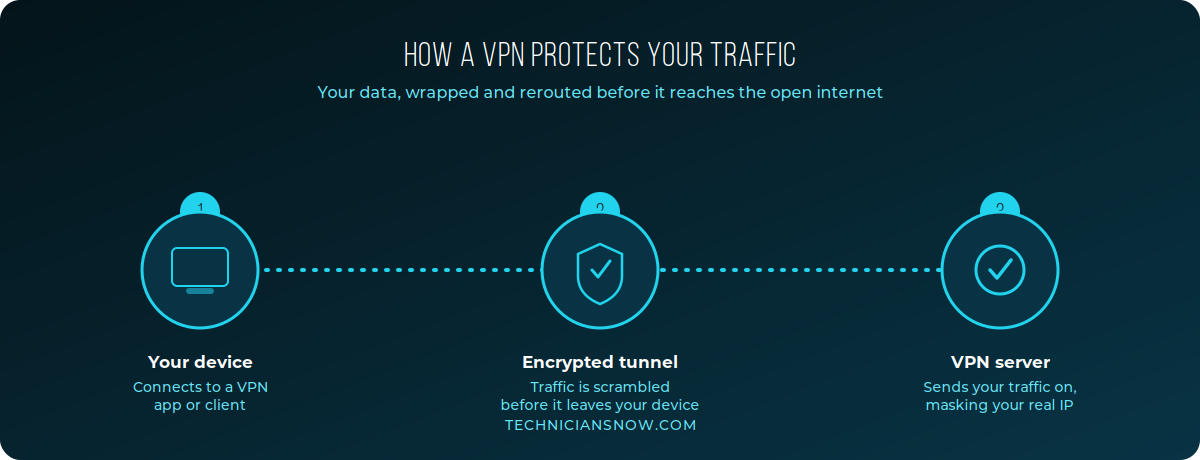
When you connect to a VPN, your device creates an encrypted “tunnel” to a VPN server before any of your traffic touches the open internet:
- Your device connects to a VPN app or client and initiates a secure connection.
- Encryption happens locally, scrambling your traffic before it ever leaves your device — so even your home Wi-Fi router or ISP only sees encrypted data, not what you’re actually doing.
- The VPN server decrypts your traffic and sends it on to its actual destination (a website, an app, a game server), using the VPN server’s IP address instead of your own.
- The response comes back through the same encrypted tunnel, so the website only ever sees the VPN server’s location and IP — never yours directly.
The encryption step is what a VPN actually adds — the IP masking is a side effect of routing through the server.
What a VPN Actually Hides
- Your IP address — websites see the VPN server’s IP, not your home or mobile network’s IP.
- Your approximate location — since location is typically inferred from IP address, a VPN can make you appear to be browsing from wherever the server is located.
- Your browsing activity from your ISP and local network — your internet provider, and anyone else on a shared or public Wi-Fi network, can only see encrypted traffic, not which sites you’re visiting.
What a VPN Does Not Protect You From
This is the part most VPN marketing conveniently leaves out, and it matters for setting realistic expectations:
- It doesn’t make you anonymous. Any site you log into — email, social media, banking — still knows exactly who you are once you sign in, VPN or not.
- It doesn’t stop malware or phishing. A VPN encrypts your connection; it doesn’t scan downloads or block malicious links. That’s the job of antivirus software and safe browsing habits.
- It doesn’t hide your activity from the VPN provider itself. Your traffic is visible to whichever VPN company you’re using, which is why a provider’s logging policy matters more than almost any other feature.
- It doesn’t guarantee anonymity against sophisticated tracking. Browser fingerprinting, account logins, and tracking cookies can still identify you across sessions regardless of your IP address.
Common, Legitimate Reasons People Use a VPN
- Public Wi-Fi security — encrypting your traffic on an untrusted coffee shop or airport network so other people on that network can’t snoop on your activity.
- Accessing region-specific content or services while traveling, where a service you normally use at home is otherwise unavailable.
- Bypassing ISP throttling on certain types of traffic, since some providers slow specific activity types when they can identify it.
- General privacy from data brokers and ISPs that otherwise log and sometimes sell browsing pattern data tied to your household’s IP address.
Types of VPNs
- Personal/consumer VPNs — the kind covered in this guide, run through an app on your phone or computer, connecting to a provider’s server network.
- Business/corporate VPNs — used by companies to let remote employees securely access internal company networks and resources, typically configured by an IT department rather than chosen freely by the user.
- Router-level VPNs — configured directly on a home router so every device on the network is covered automatically, without installing an app on each device individually.
How to Choose a VPN Provider
If you decide a VPN fits your situation, a few factors matter more than marketing claims about speed or server count:
- A clear, ideally audited no-logs policy — since the provider itself can see your unencrypted traffic, their own logging practices become the actual privacy boundary.
- Strong, modern encryption protocols (current industry-standard protocols rather than outdated ones some budget providers still default to).
- A kill switch feature, which blocks all internet traffic if the VPN connection drops unexpectedly, preventing accidental exposure.
- Transparent jurisdiction and company ownership — where a provider is legally based affects what data requests they can be compelled to comply with.
VPNs vs. Other Privacy Tools
A VPN is one privacy tool among several, and it’s often confused with tools that solve different problems:
- VPN vs. Tor — Tor routes traffic through multiple independent volunteer relays rather than a single provider’s servers, offering stronger anonymity at the cost of significantly slower speeds; a VPN is faster but relies on trusting a single company.
- VPN vs. incognito/private browsing mode — private browsing only stops your own browser from saving history and cookies locally; it does nothing to hide your traffic from your ISP or the sites you visit, which is the opposite of what a VPN actually does.
- VPN vs. antivirus software — these solve entirely different problems and are not substitutes for each other; a VPN encrypts and reroutes traffic, while antivirus software scans for and blocks malicious files and code.
Common VPN Myths Worth Correcting
- “A VPN makes me completely anonymous online.” Not true — logins, tracking cookies, and browser fingerprinting can still identify you regardless of your VPN connection.
- “Free VPNs are just as good as paid ones.” Usually not — free VPNs often monetize through data logging or ad injection, which runs counter to the privacy goal most people are using a VPN for in the first place.
- “A VPN protects me from viruses and phishing.” No — that’s the job of antivirus software and safe browsing habits, not encryption.
- “Using a VPN is suspicious or only for people hiding something.” VPNs are mainstream tools used routinely by remote workers, frequent travelers, and privacy-conscious individuals for entirely ordinary reasons.
A VPN is one piece of a healthy device-maintenance routine — see our guide on speeding up a slow laptop for the other side of that equation.
Frequently Asked Questions
Does a VPN slow down my internet?
Usually slightly, yes — encryption and the extra routing step add some overhead, though a well-run VPN on a nearby server often has a minimal, barely noticeable impact.
Is it legal to use a VPN?
In most countries, yes — VPNs are legal and widely used for legitimate business and personal privacy purposes. A small number of countries restrict or ban VPN use; check local regulations if you’re traveling somewhere with strict internet laws.
Can my employer see what I do on a VPN?
If you’re using a company-provided VPN for work, your employer’s IT department can typically monitor traffic on that connection, since it routes through infrastructure they control — this is different from a personal consumer VPN.
Do free VPNs work as well as paid ones?
Free VPNs often monetize through more aggressive data logging, slower speeds, or ad injection — if privacy is your actual goal, a reputable paid provider with a transparent no-logs policy is typically a safer choice.
Do I need a VPN if I only use my phone at home?
Less critically than on public Wi-Fi, but a VPN can still hide browsing activity from your home ISP even on a trusted network — whether that’s worth it depends on how much you value that specific layer of privacy.