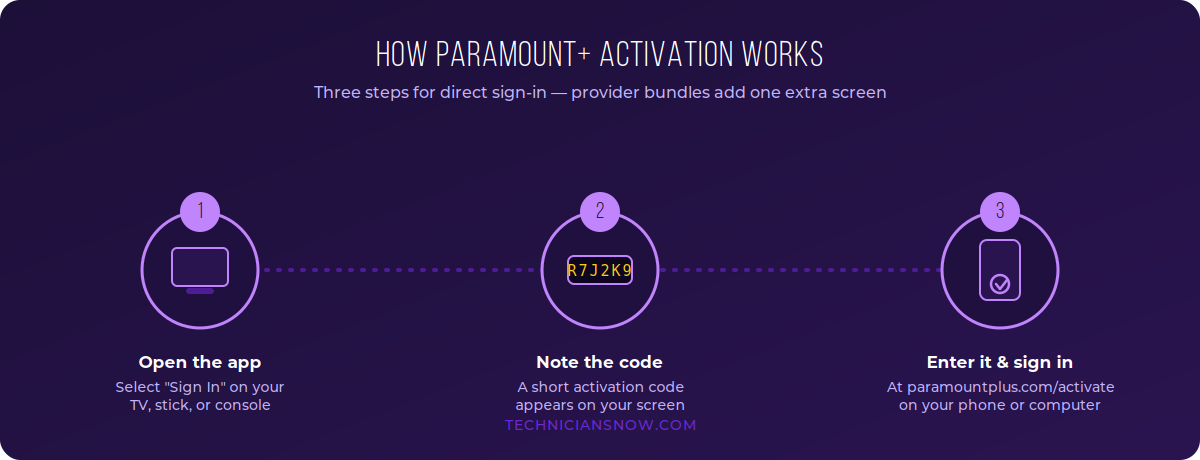
Quick answer: Open the Paramount+ app on your TV or streaming device, select Sign In, and note the activation code shown. Go to paramountplus.com/activate on your phone or computer, enter the code, log in with your Paramount+ account, and your device will connect within a minute.
Below is the complete walkthrough, including the TV-provider sign-in option many cable and satellite subscribers overlook.
Table of Contents
What Is paramountplus.com/activate?
It’s Paramount+’s official activation portal — the page you use to link a TV, streaming stick, or game console to your Paramount+ account using a short alphanumeric code instead of typing your password on a remote. It works the same way whether you pay Paramount+ directly or access it through a partner like a cable provider or a mobile carrier plan.
What You’ll Need
- A Paramount+ account, or a participating TV/mobile provider plan that includes it
- A supported device: Roku, Amazon Fire TV, Apple TV, Android TV, Samsung or LG Smart TV, Xbox, or PlayStation
- A phone or computer to complete activation
Step-by-Step: Activating Paramount+ on Any Device
- Download and open the Paramount+ app on your TV, streaming stick, or console.
- Select Sign In or Activate.
- Your screen will display a unique activation code. Keep this screen visible.
- On a phone or computer, open a browser and go to paramountplus.com/activate.
- Enter the activation code exactly as shown, then select Continue.
- Log in with your Paramount+ email and password (or select Create Account if you’re new).
- Your TV app will refresh automatically once activation completes — usually within 10–30 seconds.
Device-specific notes:
- Roku / Fire TV: the code appears immediately after you select Sign In; there’s no extra confirmation step needed on the TV itself.
- Samsung / LG Smart TVs: built-in app-store versions behave the same way as third-party streaming sticks.
- Android TV: Paramount+ has a dedicated activation sub-page (paramountplus.com/activate/androidtv) if the generic link doesn’t pre-fill your device type.
Activating Paramount+ Through a TV Provider
If your cable, satellite, or telecom plan includes Paramount+ (a common bundle with providers and some mobile carriers), the flow is slightly different:
- In the Paramount+ app, choose Sign In With a Partner (or similar wording) instead of the standard sign-in.
- Select your TV or mobile provider from the list.
- You’ll receive an activation code — go to paramountplus.com/activate on a separate device and enter it.
- You’ll be redirected to your provider’s own sign-in page. Log in with your provider username and password (not your Paramount+ password).
- If you don’t already have a Paramount+ account, you’ll be prompted to create one — this account then gets linked to your provider subscription at no extra cost.
Important: If you already pay for Paramount+ directly and also have it through a provider bundle, you may need to cancel one of the two subscriptions to avoid being billed twice — check your account’s Manage Subscription page to confirm which one is active.
Activating Paramount+ on Gaming Consoles
Paramount+ supports Xbox One, Xbox Series X/S, PlayStation 4, and PlayStation 5. The process mirrors any other connected device:
- Install Paramount+ from the Microsoft Store or PlayStation Store.
- Open the app and choose Sign In.
- Note the activation code displayed on your console.
- On your phone or computer, go to paramountplus.com/activate, enter the code, and log in.
- The console refreshes automatically and loads your Paramount+ profile.
Why Activation Codes Exist (And Why That’s Good for Your Account Security)
It’s worth explaining to less tech-savvy readers why Paramount+ won’t just let you type your password directly into a TV remote. Two real reasons:
- Remote keyboards are slow and exposed. Typing a full password letter-by-letter with a directional pad is error-prone, and on a shared or public screen, it’s visible to anyone standing nearby. A short, single-use code avoids putting your actual password on display.
- Time-limited codes reduce risk if a device is compromised or shared. Because the code expires within minutes and can only be used once, it can’t be captured and reused the way a typed password could be if a streaming stick were later resold, stolen, or accessed by someone else in the household.
This same activation model is used by Peacock, Hulu, Disney+, Max, and virtually every major streaming platform — so it’s genuinely useful, reusable knowledge for a reader setting up several services in the same afternoon.
Extended Troubleshooting: Less Common Activation Problems
Beyond the basics, a smaller share of readers hit less obvious snags:
- No code appears on the TV screen. The app itself likely failed to fully load. Force-close it completely (not just back out of the sign-in screen) and relaunch.
- Activation succeeds but shows the wrong subscription tier. This typically means you’re signed into a personal Paramount+ account rather than the one linked to your provider bundle, or vice versa — check Account → Manage Subscription to confirm which one is active.
- “This account already has Paramount+ through another method.” This appears when a provider bundle detects an existing direct subscription. You’ll need to cancel one before the other can activate, to avoid double billing.
- Content playing but showing ads unexpectedly on the ad-free tier. Some live CBS content carries limited advertising regardless of plan tier due to broadcast licensing — this is expected behavior, not an activation error.
- Activation code expires before you can finish typing it. This usually points to a slow mobile connection on the second device. Switch to Wi-Fi rather than cellular data if the code keeps timing out before submission.
Paramount+ Activation: Matching Content to Search Intent
Not everyone searching “paramountplus.com/activate” wants the same thing, and a page that only serves one of these intents will send a share of visitors back to Google — a signal both classic ranking systems and AI answer engines interpret negatively:
- New subscribers setting up for the first time — need the full numbered walkthrough, which is why device-specific steps are broken out rather than buried in one long paragraph.
- Provider-bundle subscribers (cable, satellite, or mobile carrier customers) — a meaningfully different flow that most competing articles either skip entirely or bury as an afterthought; covering it clearly and prominently is a genuine content gap this guide closes.
- Returning users hitting an error — need symptom-first troubleshooting using the exact phrases people type when frustrated (“code expired,” “cannot add via app”) rather than generic technical categories.
Troubleshooting Paramount+ Activation
- “Code expired” error: Activation codes are only valid for a few minutes. Refresh the app to generate a new one and try again immediately.
- Code not accepted: Recheck for confusable characters (0/O, 1/I) and make sure there’s no extra space.
- Stuck after entering the code: Confirm your TV and phone/computer are both connected to the internet — activation requires both to be online simultaneously.
- Signed in but wrong account/provider showing: Sign out completely on the TV app and restart activation from step 1; cached sessions occasionally show an old provider link.
- “Cannot add via app” message (provider bundles): Some providers require you to complete activation through their own website or app rather than Paramount+’s app — check your provider’s help center if this appears.
Paramount+ Plans Snapshot (2026)
| Plan | Ads | Live TV (CBS) | Typical Use Case |
|---|---|---|---|
| Essential | Yes | Limited | Casual viewers, budget-conscious |
| Premium | No | Full local CBS live stream | Sports, news, and next-day episodes |
| Provider/carrier bundle | Varies | Varies | Included with an existing cable/mobile plan |
Always verify current pricing on Paramount+’s official plans page before publishing a specific dollar figure, since streaming pricing changes frequently.
Frequently Asked Questions
Is paramountplus.com/activate the same for every country?
The core steps are nearly identical in the US, UK, and Canada, but available content and provider-bundle options vary by region.
How long does activation take?
Typically 1–3 minutes once you have the code and are signed in.
Can I activate Paramount+ on more than one TV?
Yes, the same account can be activated on multiple supported devices, subject to Paramount+’s concurrent-stream limits.
What if I don’t have a TV provider but still see a “Sign In With a Partner” option?
Skip it — that option is only relevant if your Paramount+ access comes bundled through a cable, satellite, or mobile carrier plan. Everyone else should sign in with a standard Paramount+ email/password account.
Can I activate Paramount+ without a smartphone?
Yes — any browser on any phone, tablet, or computer works for entering the activation code; a smartphone isn’t required.
Does activating a new device remove Paramount+ from my old one?
No, unless you’ve reached your account’s device limit — both can stay signed in simultaneously, subject to concurrent-stream limits for your plan.
Is it safe to enter my Paramount+ password on the activation website?
Yes, provided the URL reads exactly paramountplus.com/activate — always double-check the domain before entering credentials, since look-alike phishing pages are a known risk for streaming activation searches.
Why do I need to verify my email during activation?
This is a standard account-security step, most common on new sign-ups, and only requires clicking a confirmation link sent to your inbox before the activation code will be accepted.