Quick answer: Open the Hulu app on your TV, select Log In, then choose Activate on a Computer. Note the code shown, go to hulu.com/activate on your phone or computer, sign in to your Hulu account, and enter the code. Your TV refreshes automatically and starts streaming within seconds.
Here’s the full breakdown for every major device, plus what to do if the code won’t work.
Table of Contents
What Is hulu.com/activate?
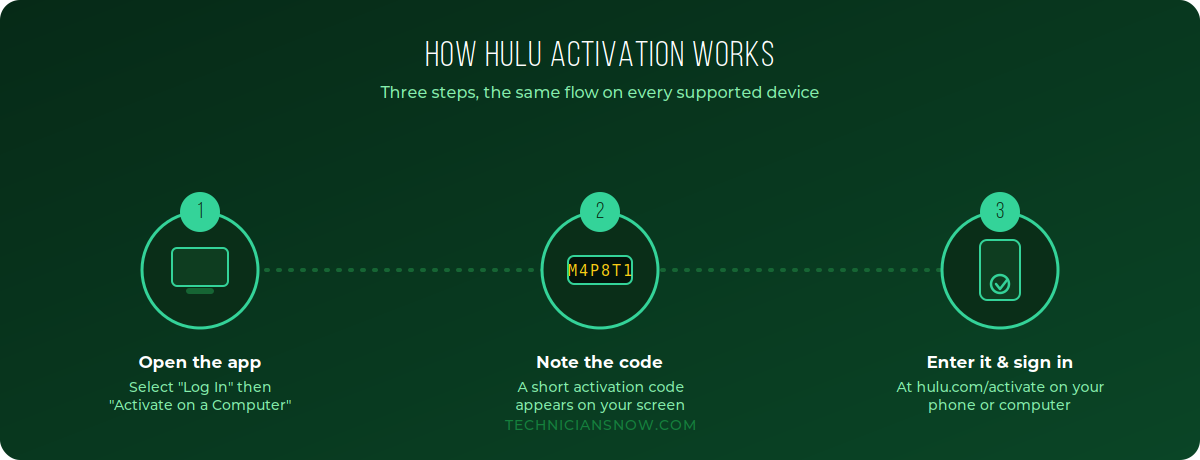
hulu.com/activate is Hulu’s official device-linking page. When you open the Hulu app on a new TV or streaming device and choose to sign in, Hulu displays a short activation code instead of asking you to type your email and password with a remote. You enter that code on hulu.com/activate from a phone or computer, and Hulu links the two automatically.
Before You Start
- An active Hulu subscription (with or without ads, and with or without the Live TV add-on)
- A supported device: Roku, Amazon Fire TV/Firestick, Samsung or LG Smart TV, Apple TV, Android TV, Xbox, or PlayStation
- A phone or computer with a browser to complete activation
How to Activate Hulu on Roku
- Turn on your Roku and open the Hulu channel (install it from the Roku Channel Store first if needed).
- On the Hulu welcome screen, select Log In.
- Choose Activate on a Computer — Roku will display a short activation code.
- On your phone or computer, go to hulu.com/activate.
- Sign in with your Hulu email and password.
- Enter the activation code shown on your Roku screen and select Activate.
- Your Roku will refresh within about 30 seconds and load your Hulu home screen.
How to Activate Hulu on Amazon Firestick
- Search for Hulu in the Amazon Appstore and install it.
- Open the app, select Log In, then Activate on a Computer.
- Note the activation code on your Firestick screen.
- On another device, go to hulu.com/activate, sign in, and enter the code.
- Click Activate — your Firestick reloads automatically and you’re ready to stream.
How to Activate Hulu on Samsung, LG, and Other Smart TVs
- Open your TV’s app store (Samsung Smart Hub or LG Content Store) and install Hulu.
- Launch the app and select Log In → Activate on a Computer.
- An activation code appears on screen.
- On your phone or computer, visit hulu.com/activate, sign in, and enter the code.
- The TV app refreshes and loads your Hulu profile automatically.
The same basic flow applies to Apple TV, Android TV, Xbox, and PlayStation — install the app, choose the “activate on a computer” style option, and complete the code entry on hulu.com/activate.
Activating Hulu on Gaming Consoles
Hulu is supported on Xbox One, Xbox Series X/S, PlayStation 4, and PlayStation 5. Activation follows the same code-based pattern:
- Install Hulu from the Microsoft Store or PlayStation Store.
- Open the app, select Log In, then Activate on a Computer.
- Note the activation code shown on your console.
- On a phone or computer, go to hulu.com/activate, sign in, and enter the code.
- Your console refreshes and loads Hulu automatically.
Why Hulu Uses a Code Instead of a Typed Password
It’s worth explaining why Hulu — like nearly every major streaming service — asks you to activate via a code rather than simply typing your email and password into the TV app directly. Two practical reasons:
- TV remotes are a poor way to type a password. On-screen keyboards navigated with a directional pad are slow, error-prone, and visible to anyone standing near the screen — a short activation code avoids exposing your real password on a shared or public display.
- Time-limited, single-use codes reduce account risk. Because the code expires within minutes and works only once, it can’t be captured and reused later the way a typed password potentially could be if a device were later shared, resold, or compromised.
Once a reader understands this pattern here, it applies directly to Peacock, Paramount+, Disney+, Max, and virtually every other streaming activation they’ll ever do.
Extended Troubleshooting: Less Common Hulu Activation Problems
Beyond the standard fixes above, a smaller number of readers run into less obvious issues:
- No activation code appears at all. The app likely failed to load correctly rather than a code-generation issue. Fully close it (not just back out of the screen) and relaunch before trying again.
- “This code has already been used.” Codes are single-use; if you refreshed the browser tab mid-activation or tried the same code twice, generate a brand-new one from the TV app rather than reusing the old screen.
- Activation completes but the wrong Hulu profile loads. If your household uses multiple profiles, select the correct one after the account-level sign-in — this is a separate step from device activation itself.
- Hulu + Live TV shows on-demand content but no live channels. This usually reflects your account’s specific plan tier rather than an activation failure — confirm your plan includes Live TV under Account → Your Subscription.
- “Device limit reached” message. Each Hulu account allows a maximum number of registered devices. Sign in at hulu.com/account, go to your device list, and remove an old or unused one to free up a slot.
Hulu Activation: Matching Content to What People Actually Want
Search intent behind “hulu.com/activate” splits into a few distinct groups, and a page that only serves one of them sends the rest of its visitors back to Google — a signal that hurts both classic rankings and AI-answer citation over time:
- First-time setup on a new TV or streaming stick — needs the complete numbered walkthrough, which is why this guide separates Roku, Firestick, and Smart TV steps instead of merging them into one generic list.
- Mid-error troubleshooting — needs symptom-first fixes using the exact phrasing people type when frustrated (“code not working,” “invalid code”) rather than internal technical categories.
- Re-activation after a reset or new device — needs quick reassurance that the process hasn’t changed, which is why a visible “last updated” date matters for this segment specifically.
Troubleshooting hulu.com/activate Issues
- Code expired: Hulu activation codes are time-sensitive. Back out of the sign-in screen on your TV and generate a new code rather than reusing an old one.
- “Invalid code” error: Re-check the code character by character — 0/O and 1/I are the most common mix-ups.
- Page not loading: Clear your browser cache, or try a different browser/device. Some older mobile browsers have redirect issues with the Hulu activation flow.
- Nothing happens after entering the code: Confirm both your TV and your phone/computer have active internet connections — activation requires a live connection on both ends at the same time.
- Managing devices already linked to your account: Hulu.com/account lets you view and remove previously activated devices if you’re near a device limit.
Hulu Plans Snapshot (2026)
| Plan | Ads | Live TV | Best For |
|---|---|---|---|
| Hulu (with ads) | Yes | No | Budget on-demand viewing |
| Hulu (No Ads) | No | No | Ad-free on-demand library |
| Hulu + Live TV | Varies | Yes | Cord-cutters wanting live channels |
Confirm current pricing on Hulu’s official plans page before publishing specific figures, since Hulu adjusts pricing periodically.
Frequently Asked Questions
Do I need a computer, or can I use my phone to activate Hulu?
Either works — hulu.com/activate is a standard webpage, so any phone, tablet, or computer browser is fine.
Can I activate Hulu on more than one TV with the same account?
Yes, subject to Hulu’s simultaneous-stream and total-device limits per account.
Why does Hulu keep asking me to reactivate my TV?
This typically happens after a factory reset, an app reinstall, or an extended period without opening the app. Simply repeat the activation steps.
Is there a difference in activation steps between Hulu and Hulu + Live TV?
No — the activation flow through hulu.com/activate is identical regardless of which plan you’re on; the plan only affects what content and channels you see once signed in.
Can I use a tablet instead of a phone or computer to activate Hulu?
Yes — any device with a modern web browser works for entering the activation code.
Will activating Hulu on a new TV log me out of my old one?
No, unless you’ve reached your account’s device limit; both can remain signed in at the same time, subject to Hulu’s simultaneous-stream restrictions.
Is it safe to enter my Hulu password on the activation page?
Yes, as long as the URL reads exactly hulu.com/activate — always verify the domain before entering credentials, since look-alike phishing pages are a known risk around streaming activation searches.
Why does Hulu ask me to verify my email during activation?
This is a routine account-security step, most common on new sign-ups or after a password reset, and only requires clicking a confirmation link before the code will be accepted.