If you used the internet in the 1990s, you almost certainly had an AOL mail account. It was a simple email service with millions of users at that time. AOL is still going strong, even though there are a plethora of free and popular email services available. It is nostalgia, a genuine liking for the user interface, or the small voice that exclaims, “You’ve Got Mail!” People continue to use AOL for whatever reason.
So, if you want to create a new AOL account (or simply need help logging into one you currently have), go ahead and do so. Make it happen. Ignore the snickers from the young people and the puzzled looks from your coworkers. You make your own decisions.
Table of Contents
What is AOL Mail?
AOL Mail is a free email service that allows users to send, receive, and manage emails from any device. It includes features like spam protection, large storage capacity, and customizable inbox settings.
It is widely used for personal and professional communication due to its simplicity and reliability.
Requirements to Create an AOL Mail Account
Before creating an AOL Mail account, make sure you have:
- A valid mobile number (for verification)
- A stable internet connection
- Basic personal details (name, date of birth)
- A unique email username
AOL requires these details to verify your identity and secure your account during registration.
Creating an AOL Email Account for Free
Step 1: Visit the AOL homepage
Simply go to www.aol.com to sign up for a new AOL account. On the left sidebar of the homepage, you can see the “Login/join” option.
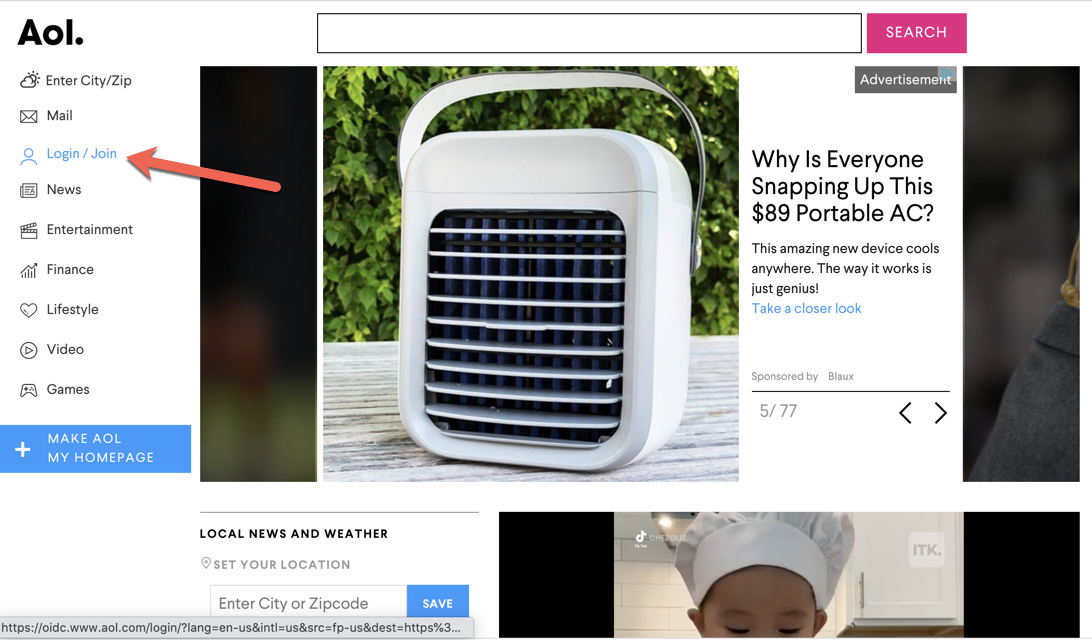
You’ll be sent to a new screen after clicking that button. There are now areas where a username and password can be entered, but if you do not have one, you cannot use it.
Step 2: Choose “Create an account”
Look underneath those blank fields for the white “Create an account” button, which you should click.
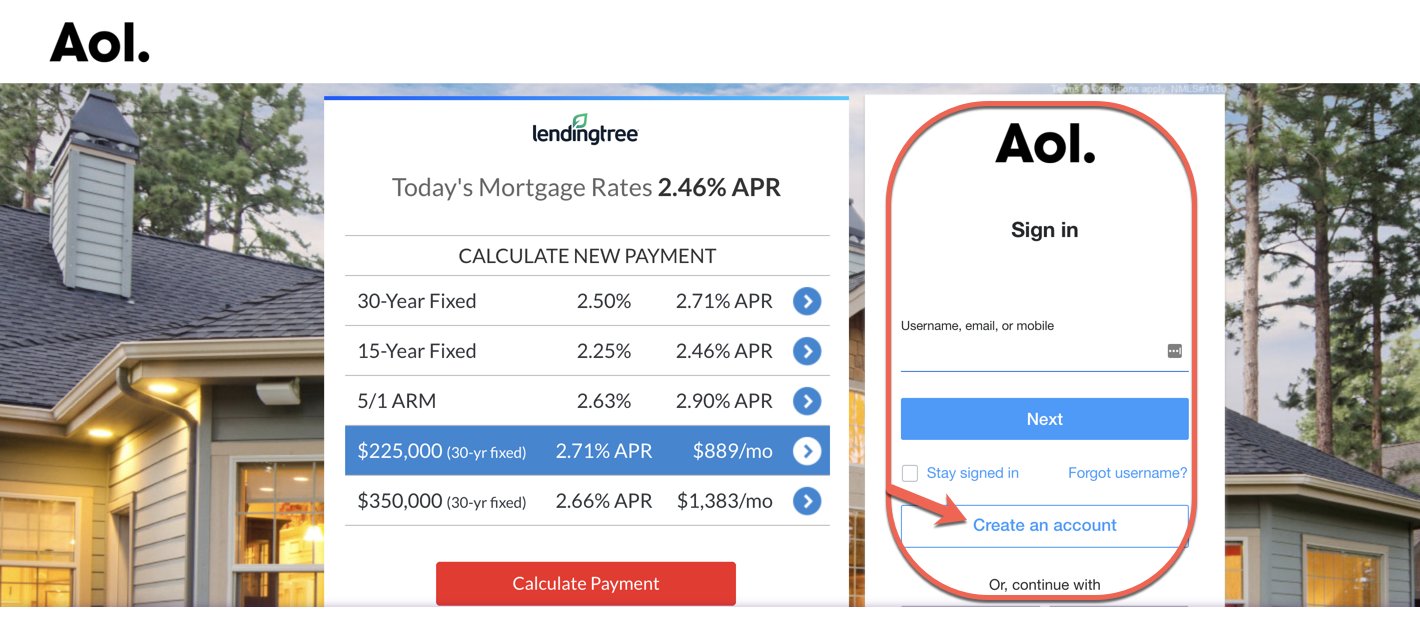
This will take you to a sign-up page where you’ll fill out some basic information such as your name, the AOL email address you want, and the password you want.
You must supply a valid phone number or you will receive an error message. This will be used later on.
Step 3: Enjoy your AOL Email

You’re done once you’ve submitted that information. From your@aol.com email address you can send emails to all your friends and family immediately.
Interesting Blog:- Best Free Email Providers – How to Select a Free Email Provider?
Login to Your AOL Account
Read on if you skipped the first part of this post because you already have an AOL account and forgot how to log in.
Step 1: Click the ‘Login’ Button on the AOL Homepage
To sign in, go to www.aol.com and click Sign In. You’ll arrive at this screen after clicking the “Login/Join” button on the left sidebar.
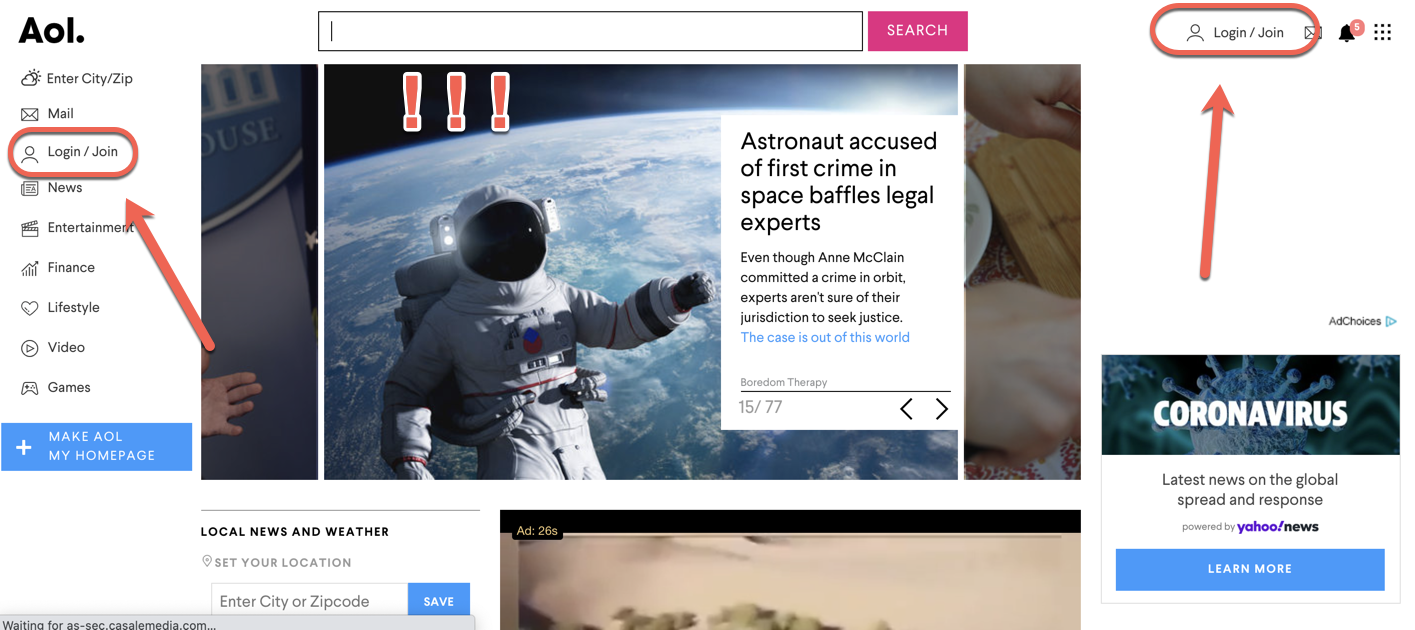
In the upper right corner of the webpage, there’s also a “Login/Join” button.
Step 2: Enter your AOL Username and Password
Anyway, return to the sign-in screen:
Enter your username (this is only the first portion of your email – for example, techguru45 if your AOL email is techguru45@aol.com), entire AOL email address, or mobile phone number where it says “Username, email, or mobile.” There was a reason they requested that information when you signed up…
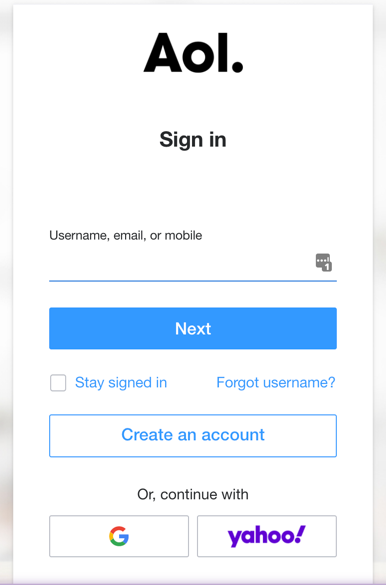
You’ll notice that you have the choice of signing in with Google or Yahoo. Possibilities.
After that, you’ll be asked to enter your password, which you’ll do by pressing next. If you forget it, write it down or use a password manager to fill it in for you. And that’s all there is to it!
You May Like:- GoDaddy Email login: 365 Email Login
Tips for Choosing a Strong AOL Email Password
To keep your account secure:
- Use a mix of uppercase and lowercase letters
- Include numbers and special characters
- Avoid using personal information like name or birthdate
- Do not reuse passwords from other accounts
A strong password helps protect your email from unauthorized access.
Common Problems While Creating AOL Account
Users may face issues such as:
- Username already taken
- Verification code not received
- Weak password errors
- Page not loading properly
To fix these:
- Try a different username
- Check your phone network
- Refresh the page or switch browsers
These are common issues and can usually be resolved.
Your AOL Username or Password Forgot?
Simply select the “Forgot username?” option below the sign-in forms if you can’t remember your username.
The same goes for your password: on the password screen, click the “forgot password?” button and select one of the choices to reset it (typically a phone number or another email address).
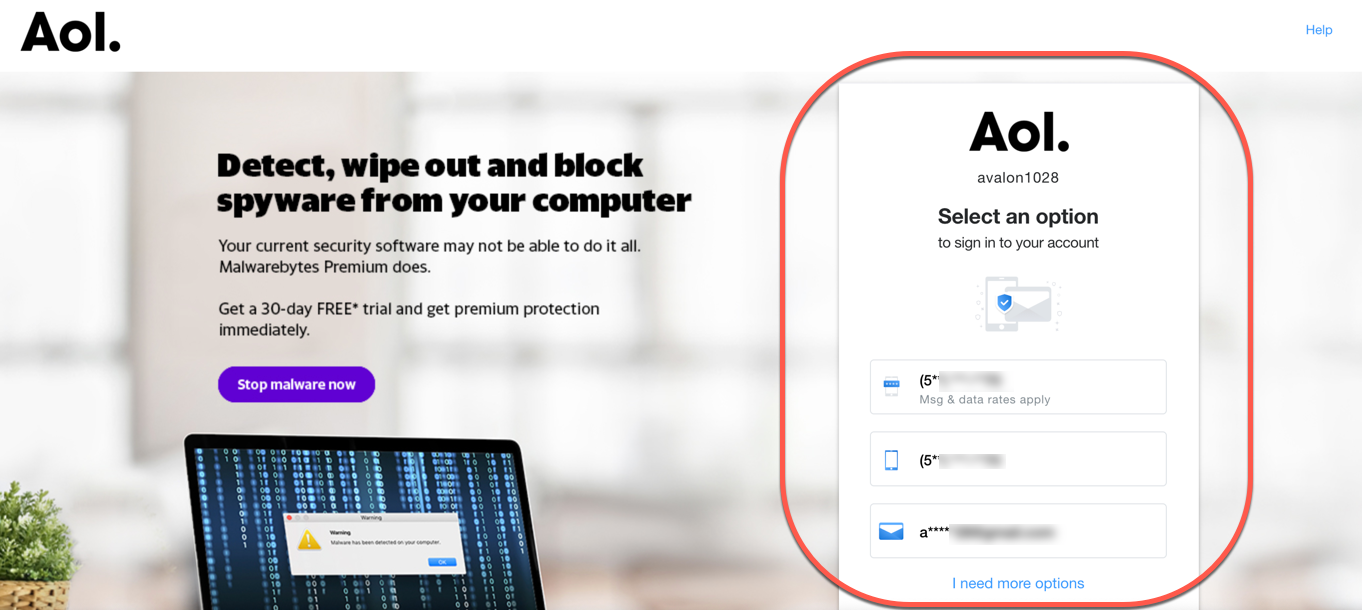
You’ll be prompted to input the verification code sent to your phone/email, after which you’ll be able to sign in by clicking “Continue“.
That concludes our discussion. All of you are ready to log in and purge your old junk mail from your dormant AOL account.
We can log in to AOL Mail on the following devices:
AOL Mail Login on a computer:
- Open your preferred web browser and go to www.aol.com
- Click on “Login/Join” on the top right corner of the page.
- Enter your AOL username or email address and click “Next.”
- Enter your password and click “Sign in.”
AOL Mail Sign-in on a mobile device:
- Download and install the AOL Mail app from your device’s app store.
- Launch the AOL Mail app and tap “Get Started.”
- Enter your AOL username or email address and click “Next.”
- Enter your password and click “Sign In.”
Login to AOL Mail on a Smart TV:
- Launch the AOL app on your smart TV.
- Navigate to the “Login” option and click on it.
- Enter your AOL username or email address and click “Next.”
- Enter your password and click “Sign In.”
How to Access AOL Mail After Creating Account
Once your account is created:
- Go to the AOL Mail login page
- Enter your email address and password
- Click “Sign in” to access your inbox
You can also access AOL Mail through mobile apps or desktop browsers.
AOL Mail Features
Some key features of AOL Mail include:
- Free email service
- Spam and virus protection
- Large storage capacity
- Access across devices
These features make AOL Mail a reliable option for everyday communication.
Important Tips Before Creating AOL Account
- Choose a professional email username
- Keep your recovery details updated
- Enable account security features
- Avoid sharing your login credentials
These steps help ensure a secure and smooth experience.
Frequently Asked Questions (FAQs)
Is AOL Mail free to use?
Yes, AOL Mail is a free email service.
Can I create multiple AOL accounts?
Yes, you can create multiple accounts using different email addresses.
Why am I not receiving verification code?
It may be due to network issues or incorrect phone number.
Can I use AOL Mail on mobile?
Yes, it is available on both Android and iOS devices.
How long does it take to create an AOL account?
It usually takes a few minutes.