Spotify is one of the most popular websites for listening to podcasts and streaming music. One of the main contributors to this accomplishment is the widespread adoption of the Spotify app. It is accessible from every smartphone, tablet, and computer you can imagine, including web browsers. Everything You Need to Know about Spotify Web Player.
Table of Contents
How To Launch Spotify Web Player Ideally
Although it might be found there, the Spotify web player is also accessible outside of Spotify.com. For the quickest access, use a desktop web browser like Google Chrome, Mozilla Firefox, Microsoft Edge, or Apple Safari to access open.spotify.com
The web player is technically supported by several Android browsers, including Google Chrome. Safari on the iPhone and iPad are compatible with it. The mobile browser player is not as dependable as Spotify’s mobile apps, so if you can, use those instead.
Interesting Blog:- Convert Spotify to MP3 – DRmare Spotify Music Converter
How To Use The Spotify Web Player
Both the desktop client and the Spotify web player have essentially the same user interface. To find music and podcasts, use the “Search” tab in the sidebar on the left.
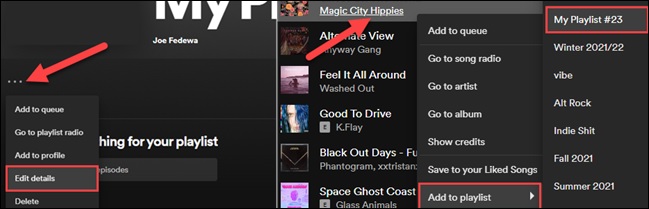
- Click “Create Playlist” in the left sidebar to start creating a playlist.
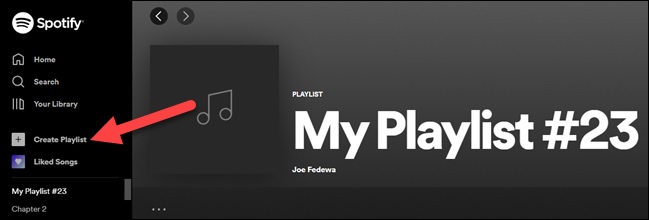
- Select “Edit Details” by clicking the three-dot menu icon from there. Bring up the ability to add any music to the playlist.
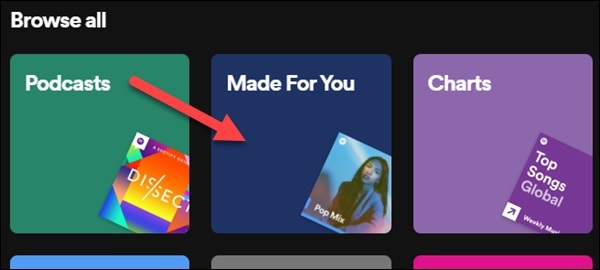
- All of the recommendations and pre-made playlists for you are located on the “Made For You” option under the Search menu.
Spotify Web Player Unblocked
The Spotify web player is a helpful substitute if your employer has blocked the applications or if they are unavailable in your country. You will still need to overcome the geo-restriction if you want to utilize it or access material from other nations.
To do it, you ought to employ a VPN. It is possible to appear to be browsing the internet from a different location than your actual one by simply connecting to a VPN server in that region. There are many top-notch VPN services available nowadays. Consult our list of the Best VPNs to get the VPN that will serve your needs the best. Nothing, whether it be on the web or in apps, should get in the way of your success.
You May Like:- Fix Spotify Error Code 4: No Internet connection
Conclusion
The experience will get more individualized the more music you listen to. After using Spotify Web Player for a while, you will have sections for Your heavy rotation with the songs you play the most, Based on your recent listening with recommendations, and Recently played with all the songs and playlists you enjoy regularly. Additionally, Daily Mix playlists will be created depending on your listening habits. They are located on your home page in the Made for You area.