Do you love watching movies on Hulu? Then definitely you must be aware of Hulu, which is an online streaming service for Shows, Movies, TV series, etc. Hulu allows you to stream your favorite movies with fewer stuff ads or no interruption of ads. But wait many of our readers keep asking about How to Block Hulu Ads or skip these annoying ads.
Table of Contents
Why Does Hulu Show Ads?
Hulu offers both ad-supported and premium subscription plans. Users on the standard Hulu plan typically see commercial breaks before and during shows and movies. These ads help support lower subscription pricing while allowing Hulu to provide access to a large streaming library.
Many users search for ways to block Hulu ads because long commercial breaks can interrupt streaming, especially during binge-watching sessions. Hulu currently offers:
- Hulu (With Ads)
- Hulu (No Ads)
- Hulu + Live TV plans
However, even some premium plans may still show limited ads because of streaming rights or live TV content restrictions.
Upgrade to Hulu No Ads Plan
The simplest and most reliable way to remove most Hulu commercials is by upgrading to the Hulu (No Ads) subscription plan. Hulu officially states that the majority of on-demand content becomes ad-free under this plan.
Benefits of Hulu No Ads
- Fewer interruptions during streaming
- Ad-free binge watching
- Offline downloads on supported devices
- Improved viewing experience
- Faster episode playback
Important Exceptions
Even with Hulu No Ads, some content may still include:
- Short pre-roll ads
- Post-roll ads
- Live TV commercials
- Network-required advertising
Hulu confirms that certain shows remain excluded because of licensing agreements.
Use Browser Ad Blockers for Hulu
Some users attempt to reduce Hulu ads using browser-based ad blockers while streaming on desktop browsers.
Popular options include:
- Ghostery
- uBlock Origin
- Brave Browser
- AdGuard
- Privacy-focused browsers
Ghostery states that its browser extension can block ads, trackers, and popups during Hulu streaming sessions.
Certain modern ad blockers also attempt to:
- Mute ads automatically
- Skip commercial segments
- Fast-forward ad breaks
- Reduce tracking scripts
However, Hulu frequently updates its anti-ad-blocking systems, meaning some extensions may stop working over time.
Some Easy Ways to Skip Hulu Ads.
1. AdBlock Plus
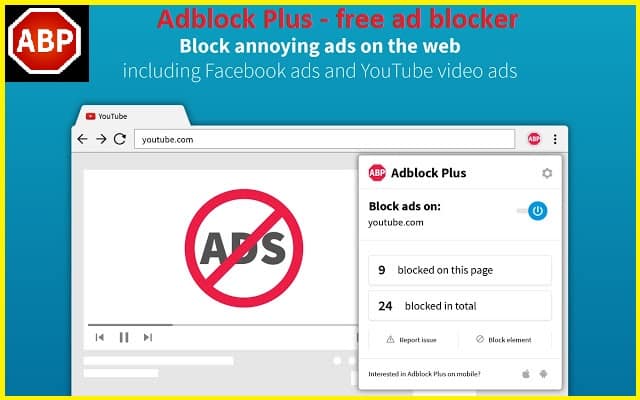
This is another great browser add-on that works just perfectly in blocking the ads on Hulu. If you are using Hulu on your Computer then it’s great to have this extension. Adblock Plus not only blocks ads on Hulu, but it also helps you block Twitch Ads and other ads appearing on the websites you visit.
Unfortunately, Ad Block Plus does not directly block any ads, Rather, it adds a white blank screen to hide the ads. If you are fine with a blank screen rather than watching lengthy Hulu Commercials, this option is perfect for you. This extension might give you errors like Hulu video not loading or video not appearing, In such cases, disable the extension temporarily and enable it after some time.
2. Blokada
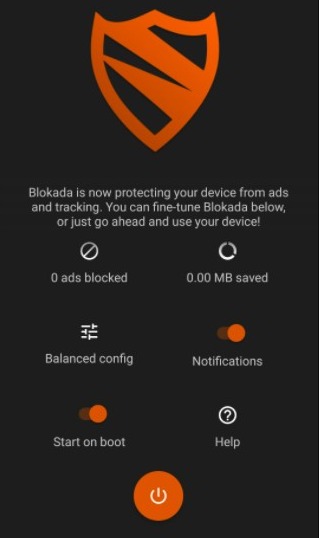
If the phone is your life, the chance is that you watch videos or movies through the phone. Aside from being practical, this also allows you to use wider choices to block the ads. There is an effective way to get rid of Hulu ads on smartphones using apps. Blokada is a third-party application for Android that can block ads when you are watching Hulu.
To enjoy the features of Blokada, simply download and install the app. Open the downloaded application and tap Blacklist. Tap Goodbye ads and Hulu ads will be blocked right away. Blokada works well for some ads but not all of them. If you are familiar with Ad Block Plus, you won’t find difficulties when using this app.
Interesting Blog:- Hulu Watch History – How to Clear History
3. Enounce MySpeed
There is another way to block Hulu ads using the software. Enounce MySpeed is software that can be opted to get rid of Hulu ads. Technically, the software does not block the ad but speeds it up. Yes, if you cannot block it, bring it fast forward. Enounce MySpeed can do a great job to speed up ads on Hulu, thus you don’t need to wait for a long time.
However, there is no free lunch in this world. This versatile and impressive application charges you $29.99. If you want to know how effective it is, get a free trial of 7 days and make your own decision subsequently. You will be surprised by how this software is what you need to skip the ads. The price is quite reasonable as you can watch your favorite show with only minor interruption after purchasing the software.

4. Reload the page
As you all know that, the Hulu income stream system works based mostly on subscriptions and commercial ads. However, you also agree that watching Zero to Four minutes of advertisements between the program is so annoying and spoil your program watching experience entirely, and the enjoyment of watching the program. Try the trick, which is explained below, and I consider you won’t regret it.
Hulu gets all its income from the web page views and these commercial ads. So, whenever you begin streaming any program, they initially show you the short length of advertisements and progressively increases the timing of the ads to three to Four minutes of advertisements.
5. Open Hulu Video on Two Tabs
Step 1- Open Hulu on your web browser and select any movie or TV show you wish to stream.
Step 2- Now, open the same program on a new tab of the same browser.
Step 3- Then, mute the volume on the 2nd tab, and fast forward to a few seconds before the first ad. You can identify the ads, as they are marked with a different color on the stream bar.
Step 4- Navigate back to the 1st tab and start streaming your video on the 1st tab.
Step 5- Keep watching till the 1st commercial ad in the 1st tab, go to the second tab and un-mute the volume and continue watching the program there.
You May Like:- UWatchfree – Free Online Movies
6. Use Web Filtering
You possibly can block the Hulu advertisements through the use of the web filtering option under Access control or Parental control in your router control management.
- Connect with your wifi.
- Just open any browser on your PC and type in 192.168.0.1 or whatever your default router IP address is and hit enter.
- Now search for the option known as web filtering (it might vary, depends upon your router).
- Simply add this “ads-e-darwin.hulustream.com” domain without quotes to your block record or web filtering option.
- After that, hit apply and restart your router.
7. Go Premium
The last but not least method to block Hulu ads is by purchasing a Premium version of Hulu. As you know, the premium version eliminates add popup while you’re watching the movie. Besides, this version also provides a wide array of services to customize your experience.
Hulu Premium version is starting at $11.99 per month. This price is reasonable and worth it as the premium version effectively removes long ads from your Hulu. Don’t call yourself the biggest fans of the TV show when you don’t have this Hulu premium version.
How to Block Hulu Ads on Different Devices
The available ad-blocking methods may vary depending on the device being used.
Block Hulu Ads on PC or Mac
Desktop users have the most flexibility because browsers support:
- Ad blocker extensions
- Privacy browsers
- Script filtering tools
Popular browsers for Hulu ad blocking include:
- Brave
- Firefox
- Chrome with extensions
Block Hulu Ads on Android
Android users may:
- Use ad-blocking browsers
- Configure DNS filtering apps
- Install supported ad-blocking tools
Block Hulu Ads on Smart TVs
Smart TVs usually do not support traditional ad blockers directly.
Possible alternatives include:
- Upgrading to Hulu No Ads
- Using DNS filtering systems
- Streaming through ad-blocking-enabled devices
Block Hulu Ads on Fire Stick or Roku
Streaming devices such as Roku and Fire TV have limited ad-blocking support because apps operate inside closed ecosystems.
Most users rely on:
- Hulu No Ads plan
- Router-level filtering
- External streaming devices
Use DNS or Network-Level Ad Blocking
Advanced users sometimes block Hulu ads using network-level filtering tools such as:
- Pi-hole
- DNS filtering systems
- Router-based blocking
Community discussions suggest Pi-hole may reduce some Hulu advertising requests depending on device type and streaming method.
Important Limitation
Many Hulu ads are now server-side integrated, meaning:
- Ads are embedded directly into video streams
- Traditional ad blockers may fail
- Some blocking methods can break playback functionality
Because of this, Hulu No Ads remains the most stable long-term solution for uninterrupted streaming.
Why Hulu Still Shows Ads Even After Blocking
Some users continue seeing commercials even after:
- Installing ad blockers
- Upgrading plans
- Using privacy browsers
This usually happens because of:
- Server-side ad insertion
- Live TV streams
- Licensing restrictions
- Network partner agreements
- Unsupported ad blockers
Hulu officially confirms that some shows still display limited ads under Hulu No Ads because of streaming rights agreements.
Live TV content and sports broadcasts also continue showing normal television commercials regardless of subscription tier.
Common Hulu Ad Blocking Problems and Fixes
Users may experience issues while attempting to block Hulu ads.
Hulu Detects Ad Blocker
Some users report black screens or playback interruptions when Hulu detects browser ad blockers.
Possible fixes:
- Update the extension
- Try another browser
- Use privacy-focused browsers
- Disable conflicting extensions
Modern Hulu systems actively detect some ad-blocking tools.
Hulu Still Showing Ads on No Ads Plan
If commercials still appear:
- Verify your subscription plan
- Sign out and back in
- Refresh account settings
- Clear app cache
Some shows intentionally include short ads before and after playback.
Ad Blocker Causes Playback Errors
Some browser extensions may:
- Freeze streams
- Trigger buffering
- Cause black screens
- Block video playback
Temporarily disabling extensions can help identify compatibility problems.
Hulu With Ads vs Hulu No Ads
| Feature | Hulu With Ads | Hulu No Ads |
|---|---|---|
| Monthly Cost | Lower | Higher |
| Commercial Breaks | Frequent | Mostly removed |
| Offline Downloads | Limited | Supported |
| Live TV Ads | Yes | Yes |
| Streaming Experience | Interrupted | Smoother |
Many users consider the No Ads plan worthwhile for binge watching and uninterrupted streaming sessions. Community discussions frequently mention the noticeable difference in viewing experience between both plans.
Is Using Hulu Ad Blockers Safe?
Using reputable ad blockers and privacy tools is generally safe when downloaded from official sources.
Users should avoid:
- Unknown browser extensions
- Fake Hulu ad blocker apps
- Modified streaming APKs
- Suspicious VPN services
Trusted ad blockers usually provide:
- Tracker blocking
- Privacy protection
- Faster browsing
- Reduced popups
However, users should understand that some ad-blocking methods may violate streaming platform terms or stop functioning after Hulu updates its systems.
Frequently Asked Questions for “How to Block Hulu Ads”
Can I block ads on Hulu?
Yes, users can reduce or remove many Hulu ads using:
- Hulu No Ads subscription
- Browser ad blockers
- Privacy browsers
- DNS filtering systems.
What is the best way to remove Hulu ads?
The most reliable method is upgrading to Hulu (No Ads), which officially removes ads from most on-demand content.
Why does Hulu still show ads on No Ads plan?
Some content still contains limited ads because of licensing agreements or Live TV broadcasts.
Do Hulu ad blockers work on Smart TVs?
Traditional browser ad blockers usually do not work directly on Smart TVs because streaming apps operate separately from browsers.
Can Hulu detect ad blockers?
Yes, Hulu may detect some browser ad blockers and trigger playback issues or black screens.
Does Pi-hole block Hulu ads?
Some users report partial success using Pi-hole, although server-side ads remain difficult to block completely.
Is Hulu No Ads completely ad-free?
No, some titles and live broadcasts may still include limited advertisements.
Is using a Hulu ad blocker legal?
Using ad blockers is generally legal in many regions, although streaming services may restrict unsupported methods or detect ad-blocking behavior.